Before we dive into the juicy details, we need to have a moment of absolute honesty. When you type “best AI tools” into Google, you are usually served up articles written by AI itself, full of corporate fluff and enterprise jargon that means nothing to a small business in Birmingham or Bristol.
We are not judging these platforms on abstract technical brilliance. Honestly, who cares about the underlying neural architecture of a tool if you cannot use it to chase a late invoice without getting a massive headache? We are judging them on what actually matters to a busy business owner like you:
- Ease of Setup: Can you get it running by Friday afternoon, or will it require fourteen separate training workshops?
- Speed to Value: Does it actually save you time or generate new leads in the first month?
- Realistic Pricing: Can you start experimenting for free, and will the price remain manageable when you actually start using it?
- App Coverage: Does it connect the five pieces of software you actually use, or just obscure American marketing apps no one has ever heard of?
- How Much Technical Skill is Required: If you still use Excel for everything, will this tool make you cry?
- UK Friendliness: Is it optimised for the systems, data protection laws (hello GDPR), and idiomatic language of the UK market?
If you want a detailed breakdown of the biggest AI risks for a small business or how to decide between custom and off-the-shelf tools, go and read those posts first. We are all about the tools today. We also need to be honest about our bias here. We tend to favour practical systems that help you ship useful automation quickly rather than complex platforms built for multi-national corporate giants. Some powerful tools are not ranked highly here because they are simply too much for the average small business owner who just wants to get things done.
Alright, pint finished? Let’s meet the contenders.
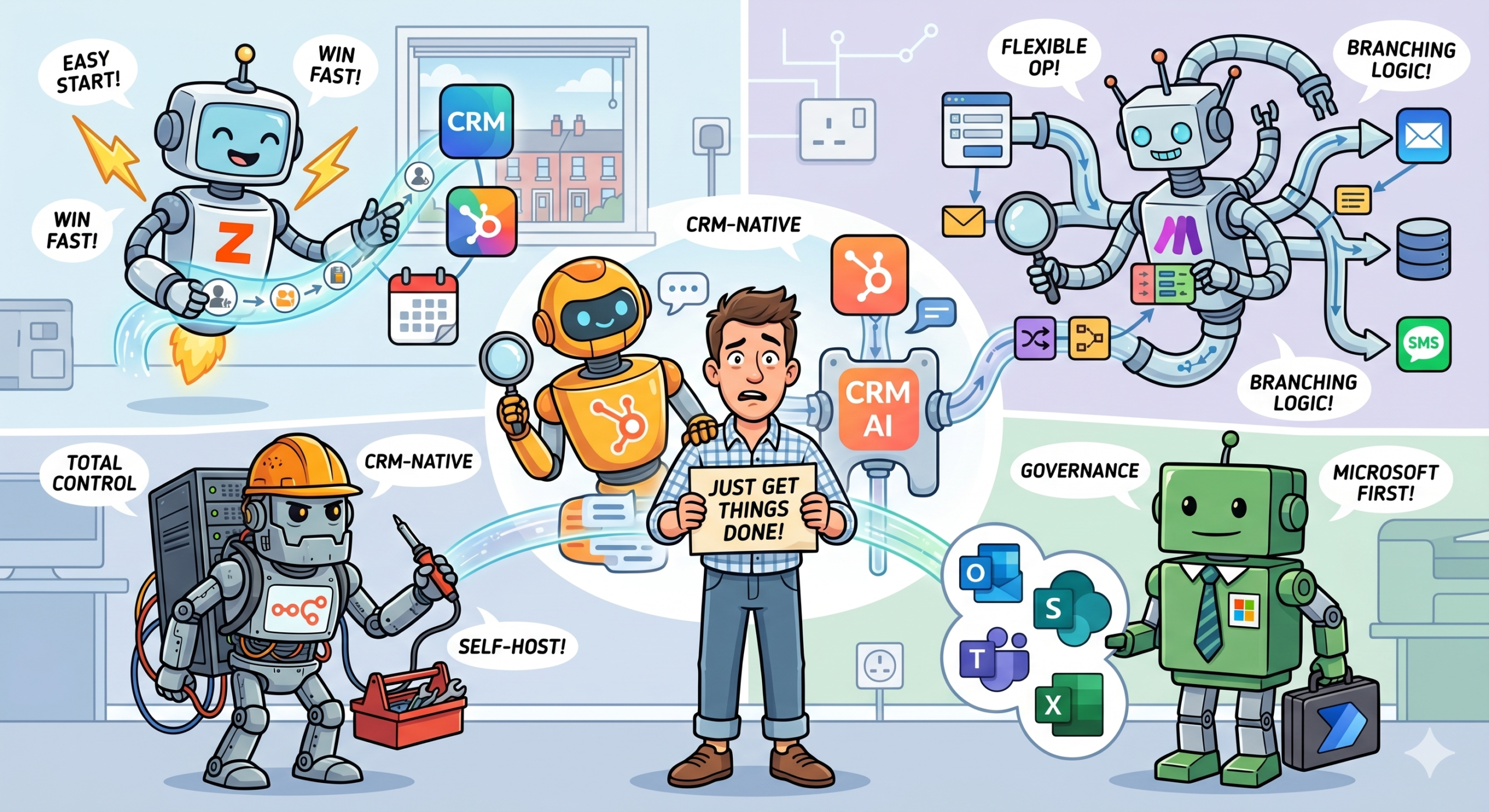
1. Zapier: The “I Just Need This to Work” Champion
If you want the absolute shortest path from “overwhelmed” to “automated”, you must look at Zapier. It remains the default recommendation for many small businesses simply because it makes connecting different applications remarkably approachable.
Think of Zapier as the ultimate digital universal translator. You take your leads from Facebook (App 1), send them to a Customer Relationship Management system (App 2), log them in a spreadsheet (App 3), and have AI draft a personalised follow-up email (App 4), all in one single, straightforward automated workflow. They call these workflows “Zaps”, and you do not need a single line of code to build them.
Zapier is brilliant because it has spent years building a massive app ecosystem. If you use a semi-popular tool for your business, Zapier probably connects to it. This tool is particularly good when you want to automate simple, repetitive tasks without hiring a developer. Their pricing page currently includes a free tier, and their Professional plan starts from around $19.99 per month billed annually, which keeps the entry point manageable for early experiments.
The Sassy “But…”: Zapier knows it is easy to use, and they charge you for the privilege. As your business grows and you start running thousands of automated tasks, that Professional plan will suddenly look very expensive. Furthermore, if your workflow requires more complex logic, like “if the customer is from London, do X, but if they are from Edinburgh, do Y, and if they are a returning customer, do Z”, the visual builder can start to feel a bit constrained and frustrating.
Best For: Service businesses, agencies, and small sales teams that want results right now. View Zapier pricing.
2. Make: The “Look, I Built a Branching Pipeline” Powerhouse
You might remember this tool by its old name, Integromat. Make is for people who have used Zapier, outgrown its simple, step-by-step logic, and now want something that feels like playing with digital LEGO. It is a favourite for businesses that still want a visual builder but need more workflow sophistication. Make is often significantly more flexible than Zapier when you need branching logic, complex data transformations, or multi-step operations flows.
The real magic of Make is its unlimited visual design. You can visually map out your entire business process, creating scenarios where the automation flows like water, splitting, merging, and transforming data as it goes. If you love systems thinking or have someone in your team who enjoys “tinkering” with how things connect, Make is a total playground.
Because it operates at a slightly lower level than Zapier, it is usually much better value for operations-heavy scenarios. You can run hundreds of complex operations for a surprisingly low monthly cost. Make is powerful, but we must be entirely clear here: it is not always the best first tool for a founder who just wants a simple victory by Friday.
The Sassy “But…”: The learning curve is steep. Make has its own terminology and way of doing things, and if you have zero technical confidence, it will overwhelm you in minutes. Furthermore, if you do not implement strong governance, non-technical teams can build remarkably complex, remarkably fragile workflows that break whenever an external application updates its security settings.
Best For: Operations managers, agencies, and SMEs with someone internally who genuinely enjoys solving logic puzzles. Make is powerful, but approach with caution.
3. Microsoft Power Automate: The “Standardised Security” Default
If your entire business, from emails (Outlook) to document storage (SharePoint) to communication (Teams) to spreadsheets (Excel), already lives and breathes inside Microsoft 365, you must look at Power Automate. Its main strength is not glamour. It is proximity to the tools your team already uses every single day.
Power Automate understands standardisation. Microsoft also positions Copilot, their broader business artificial intelligence ecosystem, inside a proper compliance and permissions model, which matters deeply for many UK firms worried about data security. It is the practical answer when IT oversight and governance matter far more than flashy digital demos.
It is particularly good for standard business approval flows, SharePoint document management, Outlook rules, and Excel automation. It is the sturdy, sensible choice that keeps your data safe while still saving you time.
The Sassy “But…”: It can feel incredibly clunky and corporate compared with more modern, user-friendly builders. Mixed-stack businesses, for example, a firm using Microsoft 365 but managing its sales pipeline in Salesforce or HubSpot, may find the automated integration experience less than enjoyable. It is often described as “user-unfriendly” by those not used to the Microsoft development ecosystem.
Best For: SMEs that have already standardised on Microsoft 365 and prioritize robust governance, security, and integration with existing corporate tools over user experience. See Microsoft Copilot for organisations.
4. n8n and 5. HubSpot AI: The “Control vs Convenience” Specialists
We are grouping these two together because they represent the extreme ends of the automation spectrum. n8n is for technical depth. HubSpot is for conceptual convenience.
n8n is one of the best options for technical teams that want more control. It is unique in this list because it gives you the option of self-hosting, meaning you run the software on your own private server rather than relying on theirs. It is absolutely not the easiest tool on this list, but it is often the most appealing if your technical team cares about data portability, developer flexibility, or keeping every single part of the software stack under your own control. It gives you the power and flexibility of Make, but with significantly more control over the infrastructure.
HubSpot AI represents the opposite approach. It is not a general-purpose automation winner across every single department. However, if your business already manages its contacts, pipelines, campaigns, and customer support inside HubSpot, using their native AI and automation tools is the shortest path to useful workflows. You already have the context: your contact data and logic live there. The real advantage is contextual convenience.
The Sassy “But…”: n8n requires significant technical confidence and the resources to manage your own server infrastructure. HubSpot AI makes zero sense if HubSpot is not already central to your operations (and paying for the ecosystem can feel very expensive). These are powerful tools, but they are specialists for specific types of businesses.
Best For: n8n for technical SMEs that want absolute control. HubSpot for sales-led businesses already deeply paying for the entire HubSpot ecosystem.
The Precise Impact Verdict: How on Earth Do You Choose?
Alright, the pint is nearly empty. We have covered a lot of digital ground today. We have met the quick start champion (Zapier), the visual operator (Make), the standardized governance king (Power Automate), and the specialists (n8n and HubSpot).
If your head is still spinning, do not worry. This is not about picking the objectively “best” tool, because that does not exist. It is about picking the tool that is the best fit for your specific business. Here is our honest, no-nonsense summary.
- Want the Shortest Path to Value? Start with Zapier. Set up one simple workflow that saves you an hour a week.
- Need More Workflow Sophistication and Have a “Systems” Mind? Choose Make. It is the logical next step when Zapier starts to feel like a cage.
- Are You Heavily Invested in Microsoft 365 and Care About Governance? Choose Power Automate. It is the sturdy, sensible, secure choice.
- Do You Have Serious Technical Depth and Want Total Control? Choose n8n.
- Does Your Sales World Revolve Entirely Around HubSpot? Keep it native and use HubSpot AI.
The bigger point is this: tool choice matters far less than workflow choice. A modest automation applied to a repetitive, high-frequency task beats an incredibly impressive, sophisticated platform attached to absolutely no real business problem. A simple “if this email arrives, set a calendar reminder” Zap that runs fifty times a week will change your life far more than a complex neural network that just sits there looking impressive in your sales deck.
Stop looking for a magic wand. Instead, start with one measurable workflow. Pick one boring, repetitive task that you dread doing every week, and then go and automate it. Start small, build momentum, and see actual, measurable results.
Of course, if you want some help figuring out exactly which workflow you should automate first, or if your current CRM looks less like a powerful sales pipeline and more like a messy digital antique, we should talk. At Precise Impact, we do not just talk about automation; we build intelligent systems that work for you, not the other way around. We will do the hard, boring technical bits so you can get back to doing the brilliant work that makes your business succeed.
Don’t let another week slide by. Go and turn that manual nightmare into an automated dream today. If you get stuck, you know where to find us.